Frequently asked questions
Plain answers about what Pickuply does and doesn't do, what it costs and how it handles your callers' data. Can't find yours? Email hello@getpickuply.com.
The basics
What is Pickuply?
Pickuply is an AI receptionist for small businesses. It answers the calls you can't pick up, in your business's name, answers questions from your own details, takes the caller's details, offers a booking time and emails you a summary straight after every call.
What does an AI receptionist actually do on a call?
It greets the caller with your business name, answers questions about your hours, services, prices and area from the details you've checked, takes the caller's name, number and what they need, offers a free time if they want to book, and marks the call urgent if it matches your urgent rules.
How does Pickuply work?
Your phone diverts the calls you don't answer to your Pickuply line. Speech recognition turns the caller's words into text, a language model decides the reply from your business details, and a natural voice speaks it. After the call you get a written summary.
Which businesses is it for?
Small businesses whose calls are mostly similar: bookings, quote requests and questions about prices or availability. Trades, garages, salons, letting and estate agents, clinics and other appointment-led businesses fit well.
Does Pickuply work outside the UK?
Pickuply is built for UK businesses. It uses UK phone numbers and is priced in pounds.
Can I hear it before I sign up?
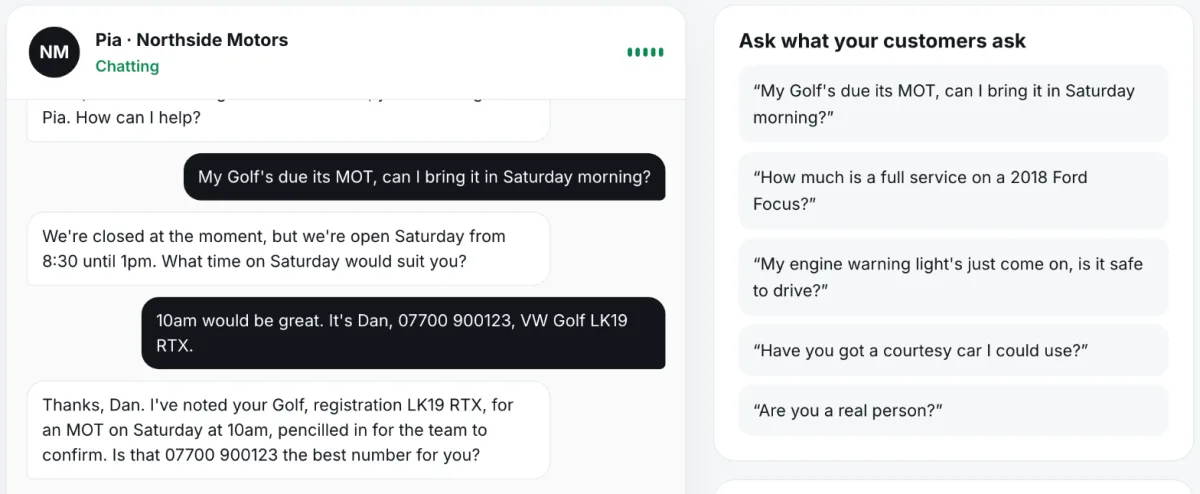
Yes. You can talk to a sample receptionist for a made-up garage, Northside Motors, or paste your own website and call your receptionist in the browser. Neither needs a card or a sign-up.
Calls and callers
Will callers know they're talking to an AI?
Your receptionist answers with the name and voice you choose. If a caller asks whether it's an AI, it says yes.
What happens when it doesn't know the answer?
It doesn't guess. It takes the caller's details and says someone will get back to them, and the question appears in your dashboard so you can teach it the answer once.
Can Pickuply put a call through to my mobile?
Yes. Turn on urgent calls and add your mobile: when a call is urgent or unsafe, Pickuply takes the caller's details and then puts them straight through to you, at any hour. You can also choose to have callers who ask for a person put through while you're open. If you miss it, the call is marked urgent in your email so you ring back first.
How do I find out about a call?
You get an email summary straight after every call, with the caller's details, what they wanted and any booking. Every call is also listed in your dashboard.
Does it send text messages?
No. Pickuply doesn't text you or your callers. Call summaries come by email and appear in your dashboard.
Does it answer at night and at weekends?
Yes. It answers whenever a call is forwarded to it, at any hour, and knows your opening hours so it can tell callers when you're next open.
Will it quote prices?
Only the prices you've given it or that are on your website. It never makes up a price to win a call.
Bookings
Can it book appointments?
Yes. It offers the caller free times inside your opening hours, takes their details and pencils the booking in for you to confirm. Each booking email has Confirm and Pick another time buttons.
Which calendars does it work with?
Google Calendar and Outlook, so it can skip times you're already busy. Without a calendar it keeps track of its own bookings, and if you use a paper diary you can photograph a page so it blocks the busy times.
Can a caller change their booking?
Yes. If someone rings back from the same number, Pickuply recognises their booking and can move it.
Is every booking confirmed automatically?
No. Bookings are pencilled in and the caller is told the team will confirm. You keep the final say.
Phone set-up
Do I keep my business number?
Yes. You keep your number and divert the calls you don't answer to your Pickuply line, so your phone still rings first.
How do I divert my calls?
On a UK mobile, divert when not answered is usually a short code you dial once. On a landline or business phone system it's a setting with your provider. Pickuply shows you the steps when your line is ready.
Can I get a new number instead?
Yes. Pickuply can give you a new UK local number that it answers every call on.
Why does Pickuply ask for my business details to set up a number?
UK telecoms rules require every number to be registered to the business that uses it, so your details are passed to our telecoms provider. Approval usually takes 1 to 3 working days.
How long does it take to set up?
You can build and test your receptionist in a few minutes from your website or Google listing. Going live on a number depends on the registration above.
Pricing and trial
How much does Pickuply cost?
Starter is £39 a month with 150 call minutes. Pro is £89 a month with 400 call minutes. After your included minutes it's £0.30 a minute.
What's the difference between Starter and Pro?
Both work the same way. Pro includes more call minutes and is the plan for busier teams with several calendars and staff, and connections to tools like a CRM or Slack.
Is there a free trial?
Yes, 14 days on any plan. No card is needed to start. If you don't add a card by the end of the trial, it simply ends and you're never charged.
Is there a contract?
No. Plans are monthly. You can cancel any time from your dashboard and your plan runs to the end of the month you've paid for. Part-months aren't refunded.
Do I pay for calls I answer myself?
No. Only calls forwarded to Pickuply use your minutes. If you divert only unanswered calls, you only pay for those.
Is Pickuply pay as you go?
No. It's a monthly plan with no contract, which you can cancel at the end of any month.
Do prices include VAT?
Checkout shows whether VAT is included or added.
Privacy and data
Are calls recorded?
No. Call audio isn't recorded. Call transcripts are deleted after 30 days, both by us and by our voice provider.
Where is my data stored?
Our database is in London. Our voice, telephone, email and analytics providers are listed in our privacy policy; where data leaves the UK, we rely on the safeguards those providers offer.
Is my callers' data used to train AI?
No. We never sell data, never use your callers' data for our own marketing and never use it to train AI models.
Who is responsible for my callers' data?
Your business decides how its callers' details are used, so it is the controller and we act as its processor under our Data Processing Agreement.
How do I delete my account and data?
Email hello@getpickuply.com. Call summaries, messages and bookings are deleted within 30 days of you closing your account or asking us to. Billing records are kept as long as tax law requires.
Compared with the alternatives
How is Pickuply different from a human answering service?
A human service is better with upset or complicated callers and can often put calls through to you live. Pickuply costs the same at any hour, answers from your real prices and diary, can offer a booking time, and puts urgent calls through to your mobile.
Why not just use voicemail?
Many callers hang up rather than leave a message, and those who do leave you calling everyone back to find out what they wanted. Pickuply answers the call, takes the details and can offer a time there and then.
How much are missed calls costing me?
That depends on how many calls you miss and what a job is worth to you. The free missed call cost calculator works it out from your own numbers.
Try it on your own business
Paste your website and call your receptionist in the browser. Free, no card.
Build my receptionist →